
Extreme Customization of Strapi 5: Integrating Quill and Multi-Tenant Architecture
Strapi 5 is an excellent headless CMS, but I customized it heavily for kuro.boo, replacing Lexical with Quill and adding database schema-based multi-tenancy.
In September 2025, the release of "Strapi 5" brought major updates for developers. With a clean break from Strapi 4's data structures, it introduced breaking changes, revamped multilingual APIs, and boosted performance. While it became a simpler and more powerful tool, some default configurations left room for improvement.
Specifically, the default "Blocks" editor (based on Lexical) is modern but lacks the advanced table editing and text decoration tools often needed for rich layout design. It couldn't even build a simple table out of the box. While table borders might be less common in Western designs, they are essential in Japan for creating structured, easy-to-read pages.
Furthermore, Strapi 5 lacks native multi-tenancy. You can run separate containers for each organization, but running a dedicated PostgreSQL database for each tenant is costly. To achieve cost-efficient multi-tenancy, I customized the backend. Here is how I modified the Strapi 5 environment for the blog "kuro.boo" to achieve a great editing experience and high management efficiency.
1. Resolving Japanese Input (IME) Quirks
Strapi is built on React, which brings certain UI behaviors. The main editor in Strapi 5 had minor issues handling Japanese IME events, leading to cursor jumps during typing. I tried three different IMEs on macOS—Apple's default, Google Japanese Input, and Kawasemi—but the cursor issues persisted because the editor caught unnecessary key events. At first, I had to write articles in external editors like Zed and copy-paste them. This was too tedious.
2. Dealing with Multiple Images
Articles need more than just text and cover images. I first tried the following plugin:
TipTap
TipTap is popular and supports multiple images, but its implementation required adding separate input blocks for every single image and text paragraph. This felt outdated and far from a true WYSIWYG experience, making me miss the smooth layout tools of Dropbox Paper (which I use frequently).
3. Transitioning to Quill
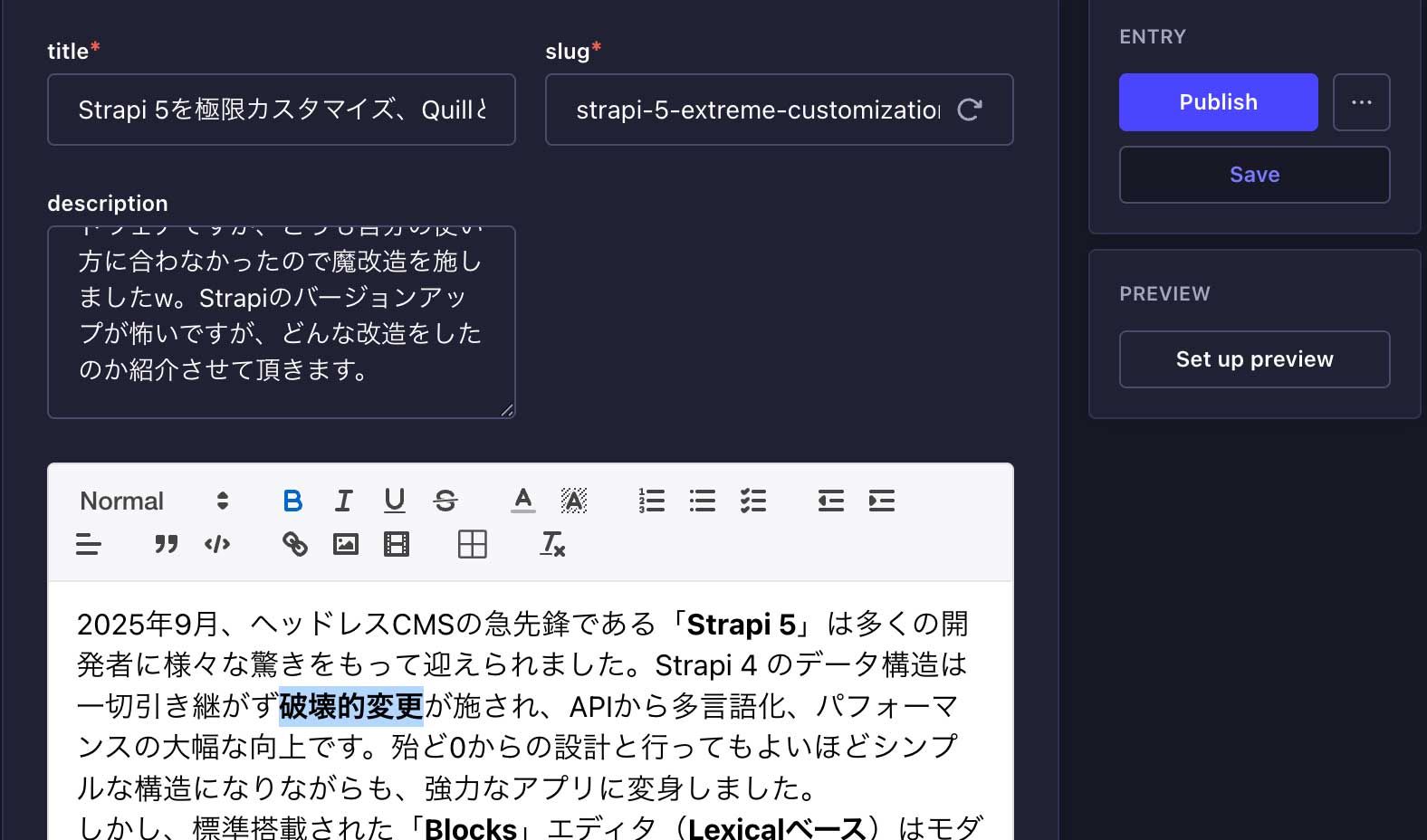
Since Lexical and TipTap did not fit my needs, I looked into Quill. With its v2 release, Quill offers excellent flexibility. Its WYSIWYG features looked promising, but it still lacked native support for advanced tables. To fix this, I integrated "quill-better-table" (after a day of debugging). This plugin allows adding/deleting rows and columns via right-click, merging cells, and custom cell styling directly inside Strapi's admin panel. Crucially, these tables save as standard HTML, making them easy to render in the Astro frontend.
This resolved both the table editing and the IME input issues, giving us a highly functional WYSIWYG editor panel inside Strapi:
4. Adding Drag-and-Drop Image Uploads
To make writing smoother, I added a drag-and-drop feature: dragging an image or pasting it from the clipboard automatically triggers Strapi's upload API, registering it in the media library and inserting it into the editor. (Note: Since drag-and-drop does not show detailed error messages for oversized files, we still have to watch the file size limits).
5. Schema-Based Multi-Tenancy
To manage multiple sites in a single Strapi instance without spinning up separate database containers, I implemented database schema switching (DATABASE_SCHEMA) within the same database instance. This keeps database costs low while maintaining separate, secure database environments for each tenant.
6. A Local-First, Static Site Generation (SSG) Workflow
While running a CMS server 24/7 is ideal for collaborative teams, it adds unnecessary costs and security risks for personal blogs or low-update sites. Therefore, I changed the deployment architecture:
- Start the local Strapi instance only when writing or editing.
- Run a development build that compiles Strapi content into static Astro pages, copying images to the build folder and updating image links.
- Stop the local Strapi instance, and deploy the fully static site to Cloudflare Pages.
This setup means our public site is hosted entirely on Cloudflare's edge network. It loads extremely fast, costs nothing to host, and eliminates the security risks of public-facing databases. On kuro.boo, I keep the local Strapi instance running on my local machine for convenience since it incurs no hosting fees.
Comparison of Default vs. Customized Settings:
Feature | Default Settings | kuro.boo Customization |
Editor Core | Lexical (Blocks) | Quill (v2+) |
Table Editing | Limited | quill-table-better (Supports cell merging & styling) |
Tenancy | Single DB / Schema | Schema-Based Multi-Tenancy |
Image Processing | Manual Upload | Automatic media upload on drag-and-drop or paste |
Dynamic Zone | Standard Picker | Integrated batch image upload panel |
Architecture | Always-on CMS | Local-only CMS with Static Site Generation (SSG) |
Build/Deploy | Manual / Simple Webhook | Automated deployment via GitHub Actions |
Conclusion
I also resolved a minor bug where any small edit updated the article's publish date, pushing older posts to the top of the feed. I added a dedicated `publishedAt` field and sorted by it instead. While modifying Strapi 5 source code directly might make future upgrades harder, this level of customization is what makes headless CMS platforms so powerful. It allowed me to build an editing environment tailored exactly to my needs.
Sources: